Convolutional Neural Networks for Image Classification
From convolutions to modern architectures
03-May-2026
CNNs for computer vision
Some of the material from this lecture comes from online courses of Charles Ollion and Olivier Grisel - Master Datascience Paris Saclay. CC-By 4.0 license.
CNN for image classification
CNN = Convolutional Neural Networks (or ConvNets)
LeCun, Y., Bottou, L., Bengio, Y., and Haffner, P. (1998). LeNet: gradient-based learning applied to document recognition.
Outline
Convolutions
Convolutions in Neural Networks
Architectures
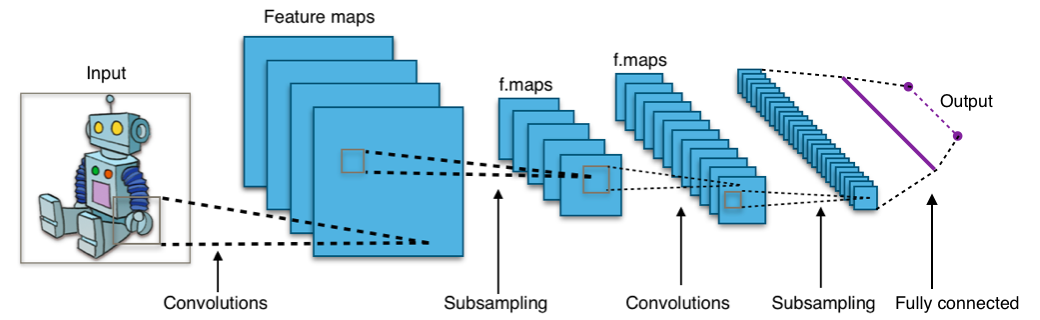
Classic CNN Architecture
AlexNet
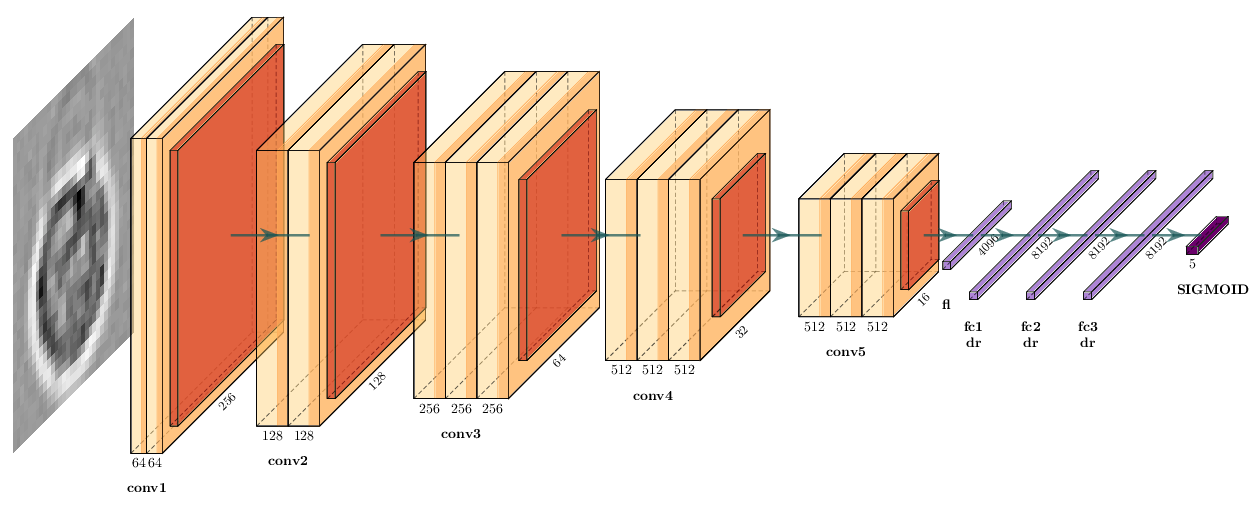
VGG16
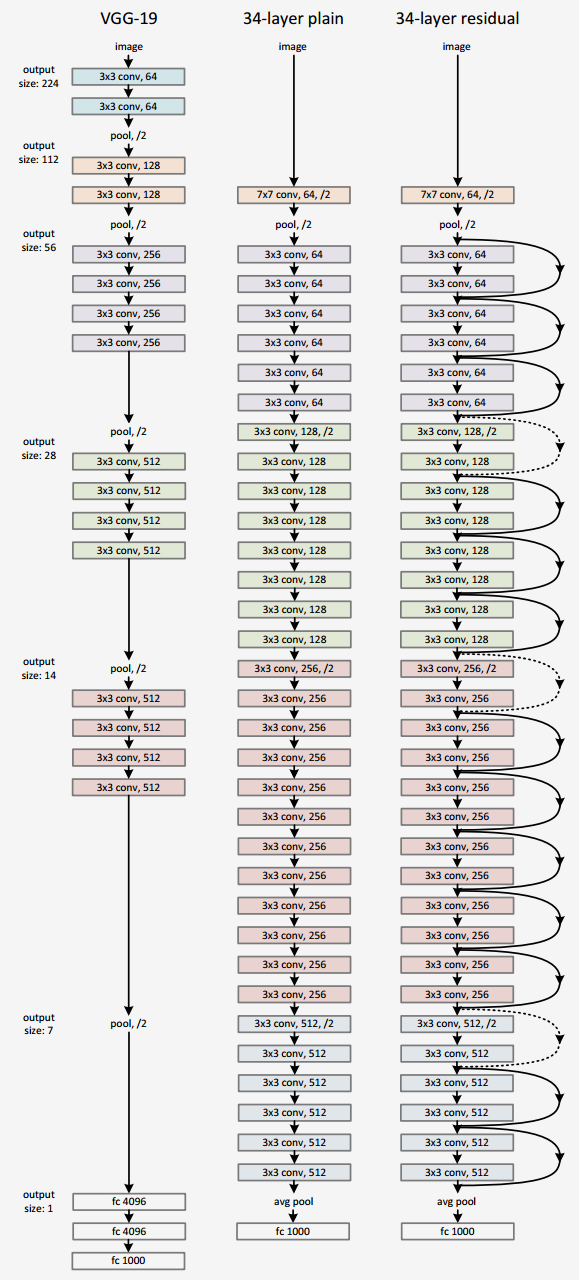
ResNet
Convolution
A mathematical operation that combines two functions to form a third function.
The feature map (or input data) and the kernel are combined to form a transformed feature map.
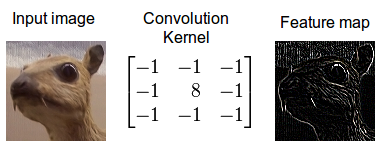
Often interpreted as a filter: the kernel filters the feature map for certain information (edges, etc.)
Convolving an image with an edge detector kernel.
The mathematical definition of the convolution of two functions f and x over a range t :
y(t) = f \otimes x = \int_{-\infty}^{\infty} f(k) \cdot x(t-k)\, \mathrm{d}k
Convolution as feature detector
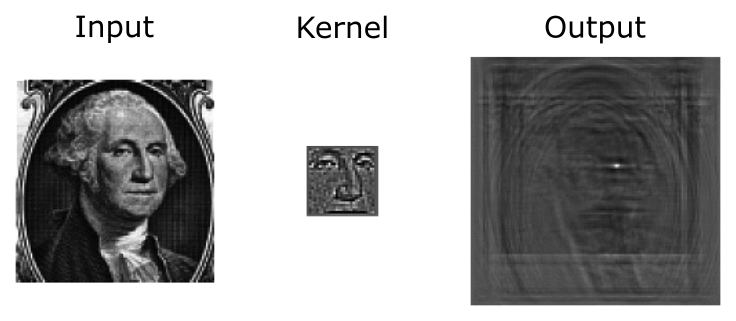
Convolutional filters can be interpreted as feature detectors:
The input (feature map) is filtered for a certain feature (the kernel).
The output is large if the feature is detected in the image.
The kernel can be interpreted as a feature detector where a detected feature results in large outputs (white) and small outputs if no feature is present (black).
Convolution in a neural network
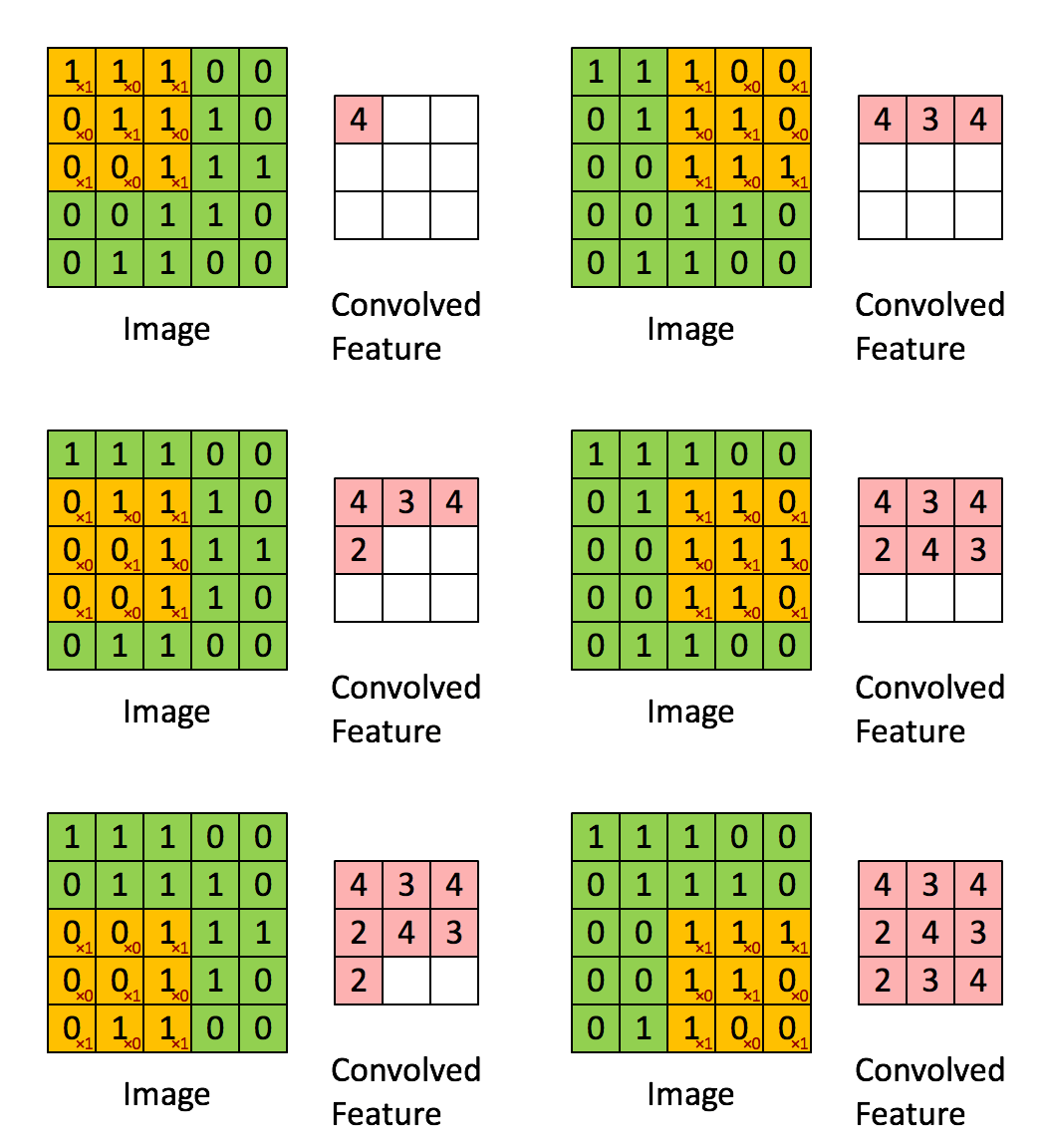
x is a 3 \times 3 chunk (yellow area) of the image (green array)
Each output neuron is parametrized with the 3 \times 3 weight matrix \mathbf{w} (small numbers)
The activation is obtained by sliding the 3 \times 3 window and computing:
z(x) = \mathrm{relu}(\mathbf{w}^T x + b)
Motivations
Standard Dense Layer for an image input:
import torch
import torch.nn as nn
# x: image batch of shape (N, 3, 480, 640)
x = torch.randn(1 , 3 , 480 , 640 )
y = nn.Flatten()(x)
# shape of y is: (N, 3 * 480 * 640)
z = nn.Linear(3 * 480 * 640 , 1000 )(y)
640 \times 480 \times 3 \times 1000 + 1000 = 922\,\text{M}
No spatial organization of the input
Dense layers are never used directly on large images
Most standard solution is to use convolution layers
Motivations
Local connectivity
A neuron depends only on a few local input neurons
Translation invariance
Comparison to Fully connected
Parameter sharing: reduce overfitting
Make use of spatial structure: strong prior for vision!
Animal Vision Analogy
Hubel & Wiesel, Receptive fields of single neurones in the cat’s striate cortex (1959)
Channels
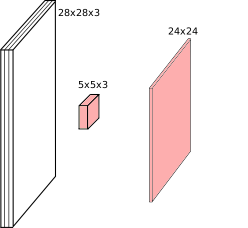
Colored image = tensor of shape (height, width, channels)
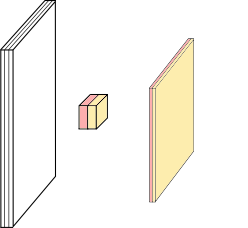
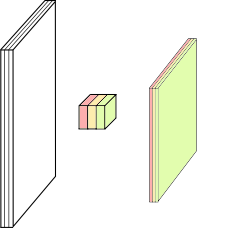
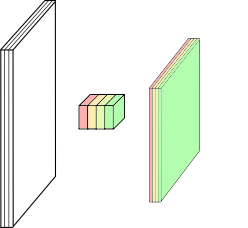
Convolutions are usually computed for each channel, and summed:
(k \star im^{color}) = \sum\limits_{c=0}^2 k^c \star im^c
Multiple convolutions
Kernel size aka receptive field (usually 1, 3, 5, 7, 11)
Output dimension: length - kernel_size + 1
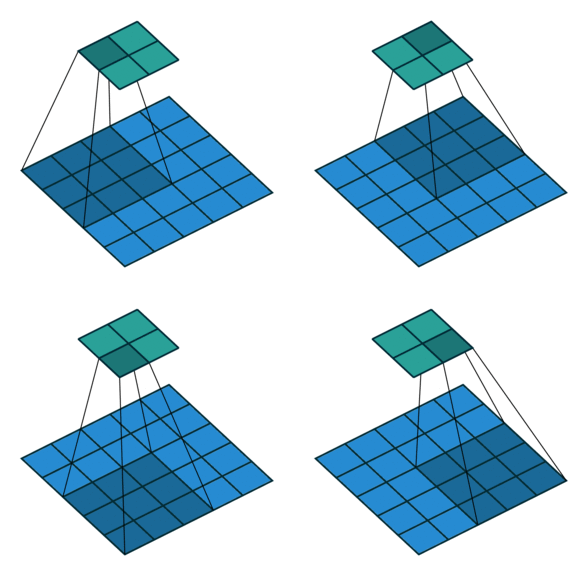
Strides
Strides: increment step size for the convolution operator
Reduces the size of the output map
Example with kernel size 3 \times 3 and a stride of 2 (image in blue)
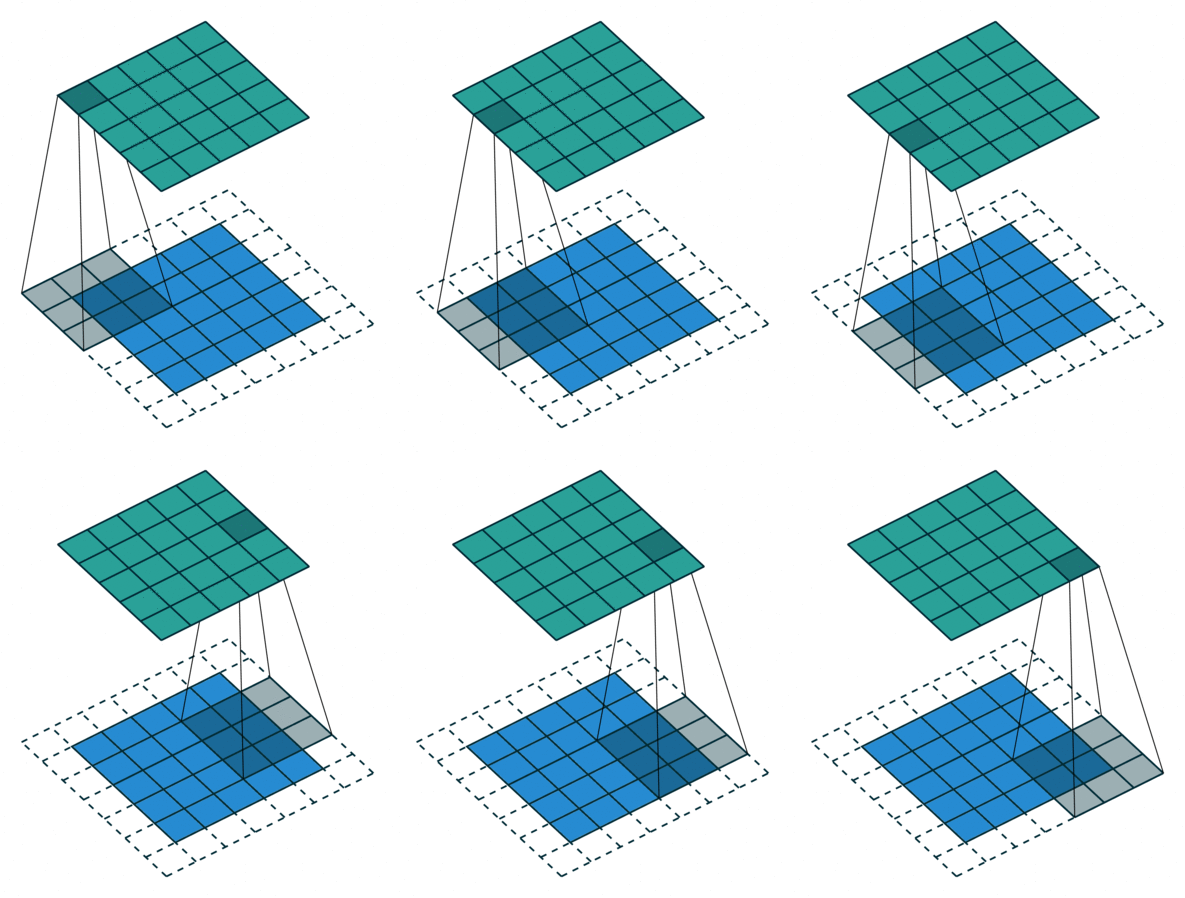
Padding
Padding: artificially fill borders of image
Useful to keep spatial dimension constant across filters
Useful with strides and large receptive fields
Usually: fill with 0s
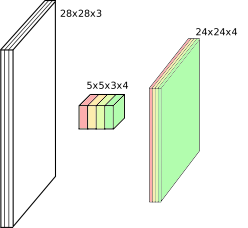
Shapes of convolution layers
Kernel or Filter shape: (F, F, C^i, C^o)
F \times F kernel size
C^i input channels
C^o output channels
Number of parameters: (F \times F \times C^i + 1) \times C^o
Shapes of convolution layers
Activations or Feature maps shape:
Input: \left(W^i, H^i, C^i\right)
Output: \left(W^o, H^o, C^o\right)
W^o = (W^i - F + 2P) / S + 1
Convolution demo
W^o = (W^i - F + 2P) / S + 1
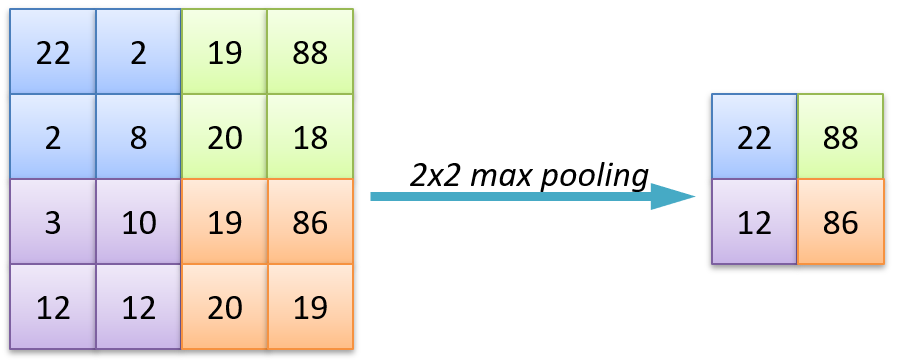
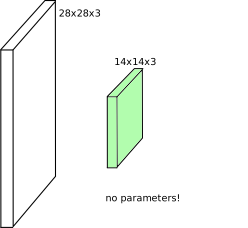
Pooling
Spatial dimension reduction
Local invariance
No parameters: max or average of 2 \times 2 units
Pooling
Spatial dimension reduction
Local invariance
No parameters: max or average of 2 \times 2 units
Batch Normalization
Normalize activations within each mini-batch (per channel):
\hat{x} = \frac{x - \mu_{\text{batch}}}{\sqrt{\sigma^2_{\text{batch}} + \epsilon}}, \quad y = \gamma \hat{x} + \beta
Standard placement in a conv block:
nn.Conv2d(in_c, out_c, kernel_size= 3 , padding= 1 ),
nn.BatchNorm2d(out_c),
nn.ReLU(inplace= True ),
Stabilizes and accelerates training of deep networks
Acts as a mild regularizer
Unlocked very deep models (ResNet, etc.)
Alternatives: LayerNorm (used in ViTs), GroupNorm (small batches)
Ioffe & Szegedy, “Batch Normalization”, 2015. BN’s statistics depend on batch size; for tiny batches or sequence models, switch to GroupNorm/LayerNorm.
Data augmentation
The cheapest regularizer you’ll ever deploy. Apply random transformations to training images on the fly:
from torchvision.transforms import v2
train_tf = v2.Compose([
v2.RandomResizedCrop(224 ),
v2.RandomHorizontalFlip(),
v2.ColorJitter(0.2 , 0.2 , 0.2 ),
v2.RandAugment(), # auto-tuned augmentation policy
v2.ToDtype(torch.float32, scale= True ),
v2.Normalize(mean= [0.485 , 0.456 , 0.406 ], std= [0.229 , 0.224 , 0.225 ]),
])
Increases effective dataset size, reduces overfitting
More advanced: MixUp / CutMix (mix images and labels)
Always validate/test on un-augmented images
Transfer learning
In 2026, you almost never train a CNN from scratch — start from ImageNet-pretrained weights:
from torchvision.models import resnet50, ResNet50_Weights
model = resnet50(weights= ResNet50_Weights.IMAGENET1K_V2)
# Replace the classification head for your N classes
model.fc = nn.Linear(model.fc.in_features, num_classes)
# Optionally freeze the backbone (linear-probe) ...
for p in model.parameters():
p.requires_grad = False
for p in model.fc.parameters():
p.requires_grad = True
# ... or fine-tune the whole network with a small learning rate.
Linear probe : freeze backbone, train only the head (fast, small data)
Fine-tune : train everything with a small learning rate (best results, more data)
In PyTorch: MLP
Fully Connected Network: Multilayer Perceptron
import torch.nn as nn
mlp = nn.Sequential(
nn.Flatten(), # (N, 1, 28, 28) -> (N, 784)
nn.Linear(28 * 28 , 256 ),
nn.ReLU(),
nn.Linear(256 , 10 ), # logits; use CrossEntropyLoss
)
In PyTorch: ConvNet
Convolutional Network
import torch.nn as nn
convnet = nn.Sequential(
nn.Conv2d(in_channels= 1 , out_channels= 32 , kernel_size= 5 , padding= 2 ),
nn.ReLU(),
nn.MaxPool2d(kernel_size= 2 , stride= 2 ),
nn.Conv2d(in_channels= 32 , out_channels= 64 , kernel_size= 3 , padding= 1 ),
nn.ReLU(),
nn.MaxPool2d(kernel_size= 2 , stride= 2 ),
nn.Flatten(),
nn.Linear(64 * 7 * 7 , 256 ),
nn.ReLU(),
nn.Linear(256 , 10 ), # logits; use CrossEntropyLoss
)
2D spatial organization of features preserved until Flatten.
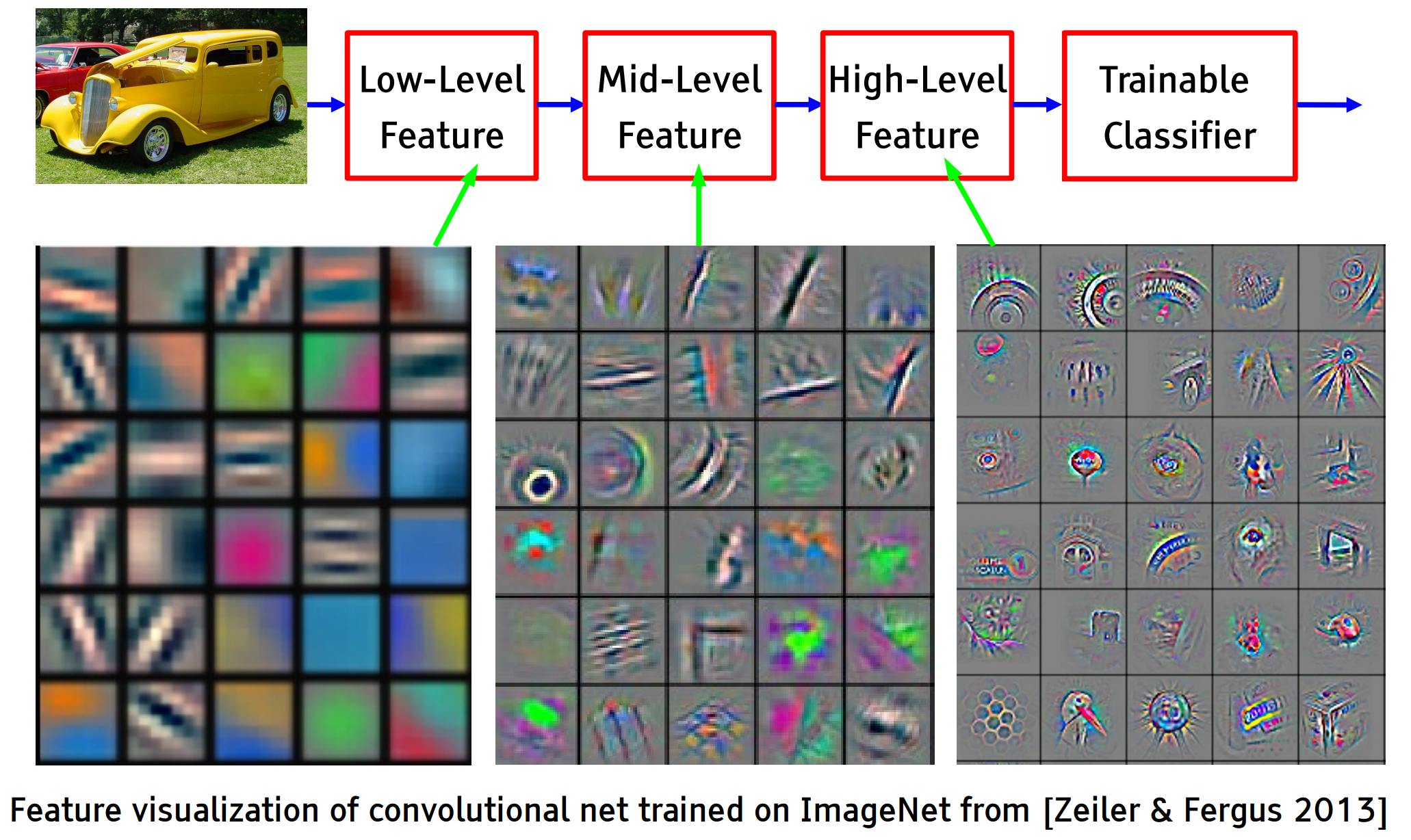
Feature visualization
Early layers detect edges and textures, deeper layers respond to parts and whole objects.
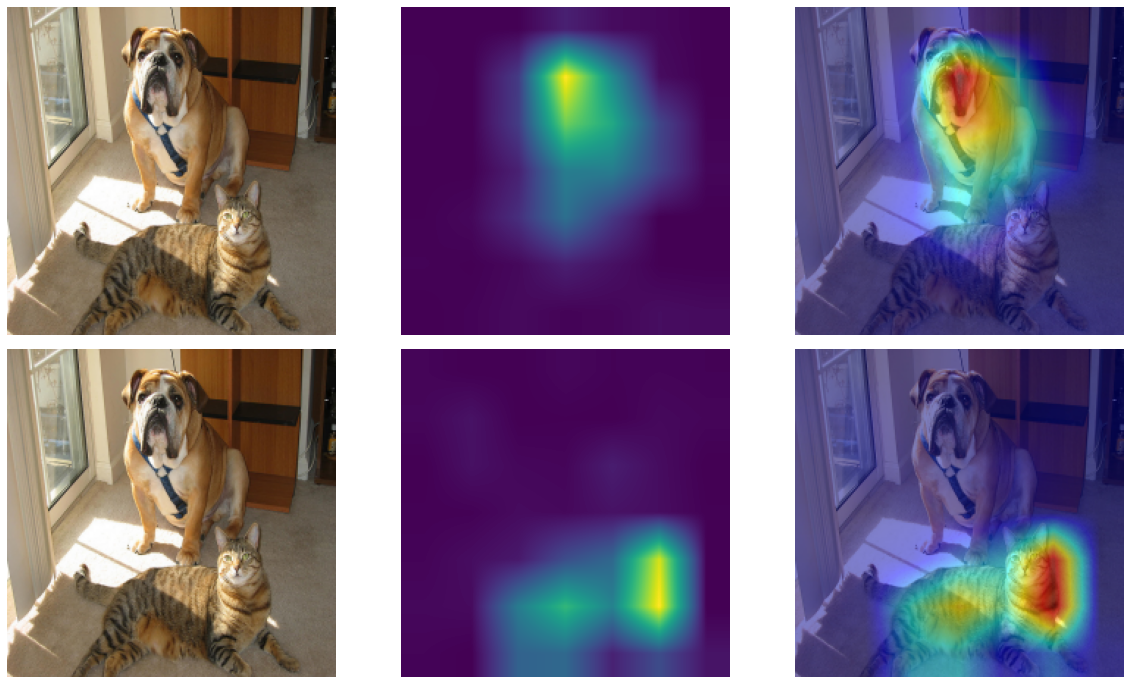
Grad-CAM — debugging predictions
Question: which pixels did the network look at to predict this class?
Grad-CAM : weight each feature map by the average gradient of the class score w.r.t. that map, then ReLU and overlay:
L^c_{\text{Grad-CAM}} = \mathrm{ReLU}\!\left( \sum_k \alpha_k^c \, A^k \right), \quad \alpha_k^c = \overline{\frac{\partial y^c}{\partial A^k}}
Class-specific saliency map, no architectural changes needed
Use it to spot shortcut learning (e.g. model attending to background, watermarks, scanner artefacts) — a key debugging tool for the lab
Selvaraju et al., “Grad-CAM: Visual Explanations from Deep Networks via Gradient-based Localization”, ICCV 2017. Available in PyTorch via the grad-cam package or as a ~30-line manual hook.
Grad-CAM — example
Classic ConvNet Architecture
Conv blocks
Convolution + activation (relu)
…
Maxpooling 2x2
Output
Fully connected layers
Softmax
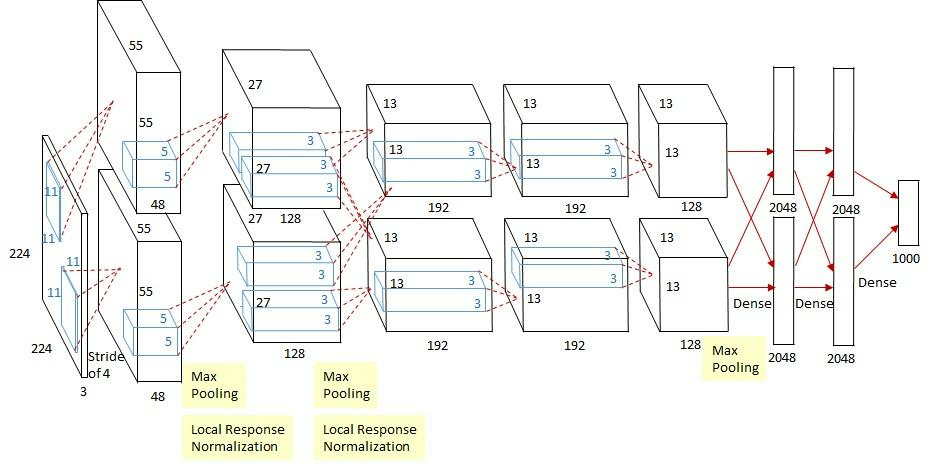
AlexNet
Input: 227x227x3 image. First conv layer: kernel 11x11x3x96 stride 4
Kernel shape: (11,11,3,96)
Output shape: (55,55,96)
Number of parameters: 34,944
Equivalent MLP parameters: 43.7 × 10⁹
Simplified version of Krizhevsky, Alex, Sutskever, and Hinton. “Imagenet classification with deep convolutional neural networks.” NIPS 2012
AlexNet
INPUT: [227x227x3]
CONV1: [55x55x96] 11x11, stride 4
MAX POOL1: [27x27x96] 3x3, stride 2
CONV2-5: [...x...x...] 5x5 / 3x3 stacks
MAX POOL3: [6x6x256] 3x3, stride 2
FC6 / FC7: [4096] 4096 neurons
FC8: [1000] softmax logits
Total params: ~28M
First very large CNN trained on GPUs, 2012 ImageNet winner
Introduced ReLU, dropout, and aggressive data augmentation at scale
VGG16
Simonyan, Karen, and Zisserman. “Very deep convolutional networks for large-scale image recognition.” (2014)
VGG in PyTorch
import torch.nn as nn
def conv_block(in_c, out_c, n):
layers = []
for i in range (n):
layers += [nn.Conv2d(in_c if i == 0 else out_c, out_c, kernel_size= 3 , padding= 1 ),
nn.ReLU(inplace= True )]
layers.append(nn.MaxPool2d(kernel_size= 2 , stride= 2 ))
return layers
vgg16 = nn.Sequential(
* conv_block(3 , 64 , 2 ),
* conv_block(64 , 128 , 2 ),
* conv_block(128 , 256 , 3 ),
* conv_block(256 , 512 , 3 ),
* conv_block(512 , 512 , 3 ),
nn.Flatten(),
nn.Linear(512 * 7 * 7 , 4096 ), nn.ReLU(inplace= True ), nn.Dropout(0.5 ),
nn.Linear(4096 , 4096 ), nn.ReLU(inplace= True ), nn.Dropout(0.5 ),
nn.Linear(4096 , 1000 ), # logits; use CrossEntropyLoss
)
Or just load it pretrained — same recipe applies to ResNet, ConvNeXt, ViT, …
from torchvision.models import vgg16, VGG16_Weights
model = vgg16(weights= VGG16_Weights.IMAGENET1K_V1)
Memory and Parameters
Activation maps Parameters
INPUT: [224x224x3] = 150K 0
CONV3-64: [224x224x64] = 3.2M 1,728
POOL2: [112x112x64] = 800K 0
CONV3-128: [112x112x128] = 1.6M 73,728
CONV3-256: [56x56x256] = 800K 294,912
CONV3-512: [28x28x512] = 400K 1,179,648
CONV3-512: [14x14x512] = 100K 2,359,296
POOL2: [7x7x512] = 25K 0
FC: [4096] = 4096 102,760,448
FC: [1000] = 1000 4,096,000
TOTAL activations: 24M → ~93MB / image (x2 for backward)
TOTAL parameters: 138M → ~552MB (x2 for SGD, x4 for Adam)
Most parameters live in the first FC layer — modern designs avoid this
Activations dominate memory at training time, parameters at inference time
Full per-layer table omitted for slide brevity. Pattern: feature map size halves while channels double through pooling stages, until the dense head dominates parameter count. Modern nets replace those FC layers with global average pooling.
ResNet
Even deeper models:
34, 50, 101, 152 layers
He, Kaiming, et al. “Deep residual learning for image recognition.” CVPR. 2016.
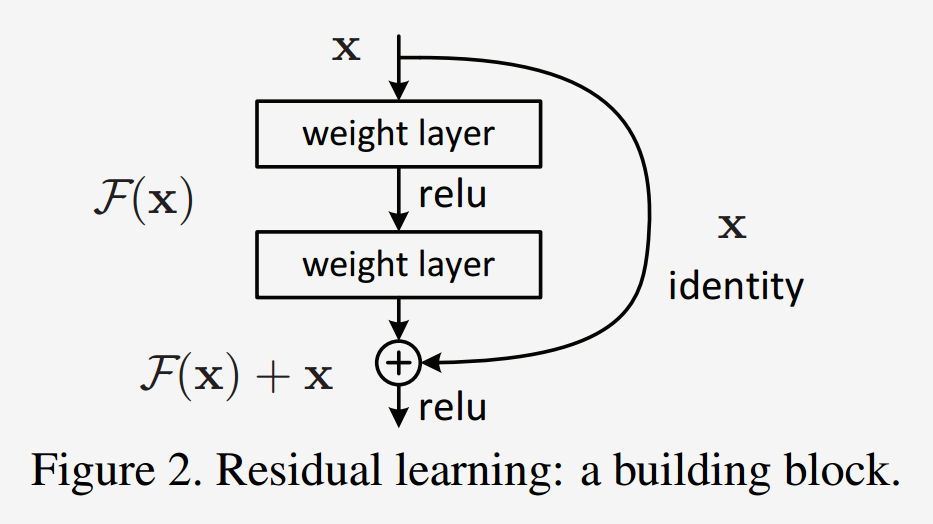
ResNet — residual blocks
A block learns the residual w.r.t. identity
Good optimization properties
ResNet vs. VGG
ResNet50 compared to VGG:
Superior accuracy in all vision tasks
5.25% top-5 error vs. 7.1%
Less parameters
Computational complexity
3.8B Flops vs. 15.3B Flops
Fully Convolutional until the last layer
What came after ResNet (2017–today)
2014
Inception
factorized convolutions (1×1 + 3×3 + 5×5)
2017
MobileNet
depthwise-separable convs for mobile / edge
2019
EfficientNet
compound scaling of width/depth/resolution
2020
ViT
image as a sequence of patches → Transformer
2022
ConvNeXt
“modernized” CNN, matches ViTs at same compute
Vision Transformers (ViT) and foundation models (CLIP, DINOv2, SAM 2) are now state-of-the-art for many tasks — covered in Friday’s self-supervised lecture .
ImageNet-1k benchmarks
ResNet-50
2015
25 M
76.1%
the workhorse baseline
EfficientNet-B0
2019
5.3 M
77.7%
great accuracy/parameter
ConvNeXt-T
2022
29 M
82.1%
pure CNN, ViT-competitive
ViT-B/16
2020
86 M
81.1%
needs large-scale pretrain
ViT-L/16 + DINOv2
2023
300 M
86.7%
self-supervised pretraining
Architectures are converging at the top — CNN vs. Transformer matters less than data, scale, and pretraining
For most lab/research settings, a pretrained ResNet-50 or ConvNeXt-T is a strong default
Numbers are approximate, sourced from the torchvision / timm model zoos. Throughput depends heavily on hardware — exact figures less important than the trend.
Summary
Convolutions exploit local connectivity and parameter sharing to scale to images
Stacking conv + pooling layers builds a hierarchy of features
BatchNorm + residual connections were the key unlocks for very deep networks
Data augmentation is the cheapest regularizer; always use it
In 2026, start from pretrained weights — fine-tune or linear-probe rather than train from scratch
Use Grad-CAM to inspect what your model actually attends to
Coming up:
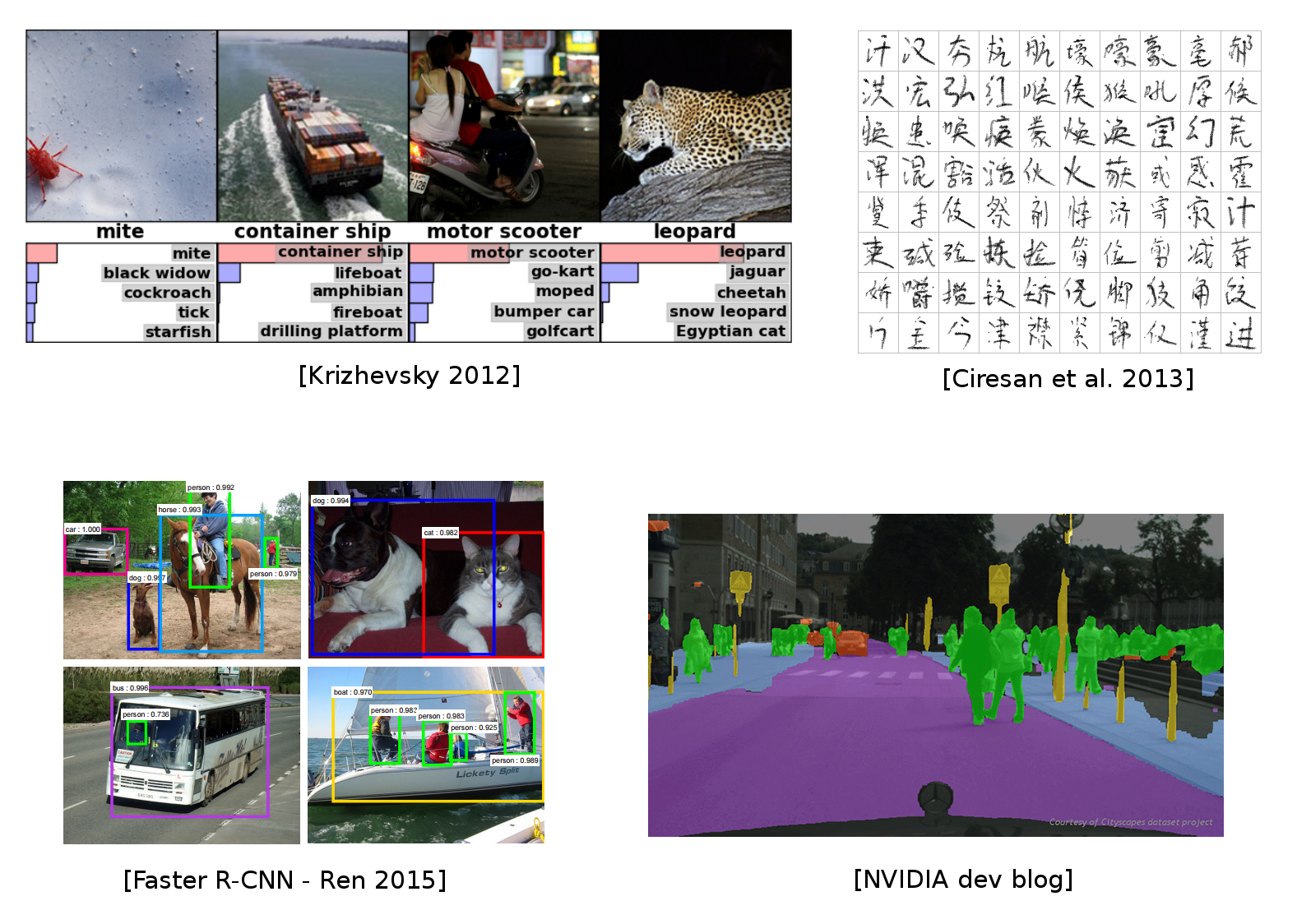
Next lecture — beyond classification: localisation, detection, segmentation
Friday — Vision Transformers, self-supervised pretraining, foundation models (CLIP, DINOv2, SAM 2)