class: center, middle, inverse, title-slide .title[ # Variables, Data types & Operators ] .author[ ### Guilherme Dias ] --- exclude: true count: false <link href="https://fonts.googleapis.com/css?family=Roboto|Source+Sans+Pro:300,400,600|Ubuntu+Mono&subset=latin-ext" rel="stylesheet"> <link rel="stylesheet" href="https://use.fontawesome.com/releases/v5.3.1/css/all.css" integrity="sha384-mzrmE5qonljUremFsqc01SB46JvROS7bZs3IO2EmfFsd15uHvIt+Y8vEf7N7fWAU" crossorigin="anonymous"> <!-- ------------ Only edit title, subtitle & author above this ------------ --> --- name: intro # Today 🧱 The **building blocks** of every R script: 1. **Variables** — giving names to values 2. **Data types** — numbers, text and `TRUE`/`FALSE` 3. **Converting types** — on purpose, and by accident 4. **Special values** — `Inf`, `NaN`, `NA` 5. **Operators** — calculating and comparing <br> .content-box-green[ Throughout, we'll use small examples from the lab: sample IDs, gene names, Ct values, read counts and p-values. ] --- name: variables # Variables A **variable** stores a value under a name, using the *assignment operator* `<-`: ``` r sample_id <- "S01" gene <- "BRCA1" read_count <- 1523 read_count ``` ``` ## [1] 1523 ``` -- Once stored, you can reuse and combine values: ``` r total_reads <- 2000 read_count / total_reads * 100 # % of reads mapped to BRCA1 ``` ``` ## [1] 76.15 ``` -- .content-box-yellow[ **Use `<-` to assign** and keep `=` for function arguments, e.g. `round(x, digits = 2)`. **Shortcut:** **Alt + -** (Windows/Linux) or **Option + -** (Mac). ] --- name: variables_naming # Naming variables A valid name contains letters, numbers, `.` and `_`, and starts with a letter. | Name | Valid? | |:-----|:-------| | `ct_value`, `sample2`, `brca1_expr` | ✅ | | `2samples` | ❌ starts with a number | | `gene-count` | ❌ `-` means minus | | `if`, `TRUE`, `NA` | ❌ reserved words | -- **Good style** * **Informative:** `ct_value`, not `x7` * **Consistent:** pick one style, e.g. `snake_case` (recommended) * **Avoid existing names** such as `c`, `t`, `T`, `F`, `mean`, `data`: legal, but confusing Your future self, your collaborators and your reviewers will thank you. --- name: data_types # Four data types you'll use every day | Type | Lab example | `typeof()` | |:-----|:------------|:-----------| | **double** | body temperature `37.5`, Ct value `24.1` | `"double"` | | **integer** | read count `1523L` | `"integer"` | | **character** | gene `"BRCA1"`, sample `"S01"`, sequence `"ATGC"` | `"character"` | | **logical** | treated? `TRUE` / `FALSE` | `"logical"` | ``` r typeof(37.5) typeof("BRCA1") typeof(TRUE) ``` ``` ## [1] "double" ## [1] "character" ## [1] "logical" ``` .footnote[Numbers are **doubles** by default, even `1523`. Add `L` for an integer: `1523L`.] --- name: casting # Converting types: casting Use `as.integer()`, `as.numeric()`, `as.character()` to convert on purpose. **Casting is not rounding!** An average of 152.7 cells per well: ``` r cells <- 152.7 as.integer(cells) # cuts off the decimals round(cells) # rounds to the nearest number ``` ``` ## [1] 152 ## [1] 153 ``` -- Other ways to round: ``` r floor(cells) # always down ceiling(cells) # always up round(3.14159, digits = 2) ``` ``` ## [1] 152 ## [1] 153 ## [1] 3.14 ``` --- name: text_to_numbers # Turning text into numbers Values exported from instruments or spreadsheets often arrive as **text**: ``` r as.numeric("24.1") ``` ``` ## [1] 24.1 ``` -- But not every text is a number: ``` r ct_values <- c("24.1", "25.3", "Undetermined", "23.8") as.numeric(ct_values) ``` ``` ## Warning: NAs introduced by coercion ``` ``` ## [1] 24.1 25.3 NA 23.8 ``` -- .content-box-yellow[ **"NAs introduced by coercion"** means values were lost. <br><br> Make sure those values were not important. Never ignore this warning! ] --- name: implicit_coercion # R converts for you (coercion) `c()` combines values, but they must all be the **same type**. <br> When you mix types, R **converts** everything to the most flexible type: 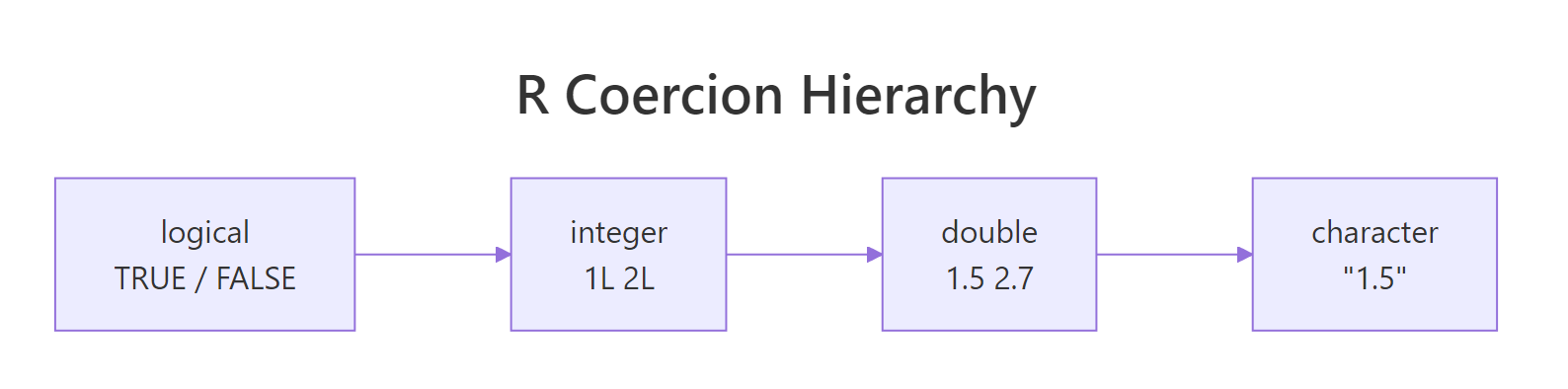 ``` r c(24.1, 25.3, 23.8) # all numbers c(24.1, 25.3, "failed", 23.8) # one word: everything becomes text! ``` ``` ## [1] 24.1 25.3 23.8 ## [1] "24.1" "25.3" "failed" "23.8" ``` -- .content-box-green[ One word in a column of numbers turns the whole column into text. <br><br> **Always check the type of your data after importing it.** ] --- name: special_values # Special values: `Inf`, `NaN`, `NA` **log2 fold change** of a gene, treated vs. control: ``` r log2(40 / 10) # 4x higher: log2 FC = 2 log2(10 / 0) # no reads in control: Inf log2(0 / 10) # no reads in treated: -Inf 0 / 0 # no reads anywhere: NaN (Not a Number) ``` ``` ## [1] 2 ## [1] Inf ## [1] -Inf ## [1] NaN ``` -- `NA` means **missing**: a value exists but is unknown, e.g. a failed sample. It is **contagious**: ``` r glucose <- c(5.1, 4.8, NA) mean(glucose) mean(glucose, na.rm = TRUE) # ignore missing values ``` ``` ## [1] NA ## [1] 4.95 ``` --- name: logical_type # Logical values: `TRUE` and `FALSE` Comparisons give `TRUE` or `FALSE`: ``` r p_value <- 0.03 p_value < 0.05 ``` ``` ## [1] TRUE ``` -- In calculations, `TRUE` counts as `1` and `FALSE` as `0`. So `sum()` **counts** how many are `TRUE`: ``` r p_values <- c(0.001, 0.2, 0.04, 0.5, 0.03) p_values < 0.05 sum(p_values < 0.05) # number of significant genes ``` ``` ## [1] TRUE FALSE TRUE FALSE TRUE ## [1] 3 ``` .footnote[Always write `TRUE` and `FALSE` in full: `T` and `F` can be overwritten.] --- name: character_type # Working with text Text (*character*) goes in quotes: `"..."` or `'...'`. ``` r dna <- "atgcgtacgtta" nchar(dna) # sequence length toupper(dna) # upper case substr(dna, start = 1, stop = 3) # first codon ``` ``` ## [1] 12 ## [1] "ATGCGTACGTTA" ## [1] "atg" ``` -- ``` r paste("BRCA1", "exon", 3, sep = "_") # build an ID paste0("S", 1:3) # sample names sub("chr", "", "chr17") # remove a prefix ``` ``` ## [1] "BRCA1_exon_3" ## [1] "S1" "S2" "S3" ## [1] "17" ``` --- name: sprintf # Putting values into sentences `sprintf()` fills placeholders with values: ``` r sample_id <- "S01" n_reads <- 1523L gc <- 41.2734 sprintf("Sample %s has %d reads (GC = %.1f%%)", sample_id, n_reads, gc) ``` ``` ## [1] "Sample S01 has 1523 reads (GC = 41.3%)" ``` | Placeholder | Fills in | Example | |:------------|:---------|:--------| | `%s` | text | `"S01"` | | `%d` | integer | `1523` | | `%.1f` | number with 1 decimal | `41.3` | | `%%` | a literal `%` sign | `%` | --- name: operators_arithmetic # Arithmetic operators | Operator | Meaning | Example | Result | |:---------|:--------|:--------|:------:| | `+` `-` `*` `/` | the usual | `7 / 2` | 3.5 | | `^` | power | `2^3` | 8 | | `%%` | remainder | `7 %% 3` | 1 | -- **qPCR relative expression** (the ΔΔCt method): ``` r delta_ct_treated <- 24.1 - 18.0 # target Ct - reference Ct delta_ct_control <- 26.3 - 18.2 delta_delta_ct <- delta_ct_treated - delta_ct_control 2^(-delta_delta_ct) # fold change ``` ``` ## [1] 4 ``` The gene is about **4x higher** in treated samples. Use brackets when in doubt: `2^-x` and `2^(-x)` are the same, but brackets make it clear. --- name: operators_comparison # Comparison and logical operators .pull-left-50[ **Compare** → `TRUE`/`FALSE` | | | |:--|:--| | `==` | equal | | `!=` | not equal | | `<`, `>` | less, greater | | `<=`, `>=` | or equal | ] .pull-right-50[ **Combine conditions** | | | |:--|:--| | `&` | AND | | <code>|</code> | OR | | `!` | NOT | ] <div style="clear: both;"></div> Is this gene **differentially expressed**? ``` r p_value <- 0.03 log2_fc <- 1.4 p_value < 0.05 & abs(log2_fc) > 1 ``` ``` ## [1] TRUE ``` .footnote[Don't mix up `=` (assign an argument) and `==` (compare).] --- name: pitfalls # Two classic pitfalls 🕳️ **1. Text is compared letter by letter, not as numbers** ``` r "10" < "9" sort(c("chr1", "chr2", "chr10", "chr9")) ``` ``` ## [1] TRUE ## [1] "chr1" "chr10" "chr2" "chr9" ``` That's why chromosome lists often come out in the "wrong" order. -- **2. Decimals are not stored exactly** ``` r 0.1 + 0.2 == 0.3 isTRUE(all.equal(0.1 + 0.2, 0.3)) # compare with a small tolerance ``` ``` ## [1] FALSE ## [1] TRUE ``` --- name: quiz # Predict the output 🤔 Write down your answers **before** the reveal: ``` r typeof(1523) as.integer(24.9) c(24.1, "Undetermined") sum(c(0.01, 0.2, 0.04) < 0.05) log2(0) NA == NA ``` -- ``` ## [1] "double" ## [1] 24 ## [1] "24.1" "Undetermined" ## [1] 2 ## [1] -Inf ## [1] NA ``` ??? NA == NA is NA: two unknown values cannot be known to be equal. Use is.na() instead. --- name: help # Getting help ``` r ?round # help page for a function example(round) # run the examples from the help page help.search("median") # search all help pages ``` <br> .content-box-green[ **Tip:** the *Examples* section at the bottom of every help page is often the fastest way to learn a function. It's also a good way to check code an AI assistant suggested. ] --- # What did we learn? | Concept | Key idea | Example | |:--------|:---------|:--------| | **Variables** | Store values with `<-` | `gene <- "BRCA1"` | | **Types** | double, integer, character, logical | `typeof(37.5)` | | **Casting** | Convert on purpose; ≠ rounding | `as.integer(152.7)` → 152 | | **Coercion** | One word turns numbers into text | `c(24.1, "failed")` | | **Special values** | `Inf`, `NaN`, `NA` | `mean(x, na.rm = TRUE)` | | **Logical** | `TRUE` counts as 1 | `sum(p < 0.05)` | | **Operators** | Calculate, compare, combine | `2^(-ddct)`, `&`, <code>|</code> | -- <br> **Remember:** after importing data, **check the types**. Most silent errors start there. <!-- --------------------- Do not edit this and below --------------------- --> --- name: end_slide class: end-slide, middle count: false # See you at the next lecture! .end-text[ <p class="smaller"> <span class="small" style="line-height: 1.2;">Graphics from </span><img src="./assets/freepik.jpg" style="max-height:20px; vertical-align:middle;"><br> Created: 12-Nov-2026 • <a href="https://www.scilifelab.se/">SciLifeLab</a> • <a href="https://nbis.se/">NBIS</a> </p> ]