Demo Slides
RaukR 2026 • Data Science With R
Roy Francis
20-Aug-2026
Introduction
Getting started
- In RStudio, File > New File > Quarto Presentation
- Add YAML matter to the top if not already there.
---
title: "This is a title"
format:
  revealjs
---- Click the Render button for a rendered preview.
- Or use
quarto::quarto_render()in R:
- Or use
quarto renderin the terminal:
Slides
Slide separators
Slides are separated by ##. Incremental content on is separated by . . . like below.
Hide or not count a slide:
## Slide Title {visibility="hidden"}
## Slide Title {visibility="uncounted"}
Slide notes
Any content inside class .notes on a slide are notes. This is only visible in presenter mode (by pressing s).
Keyboard shortcuts
- Press ?? for help.
Layout
The slide content can be organized into columns which can be nested if needed.
:::{.columns}
:::{.column width="50%"}
<div style="background-color:#fdebd0">Left content</div>
:::

:::{.column width="50%"}
<div style="background-color:#eaf2f8">Right content</div>

:::{.column width="60%"}
<div style="background-color:#d0ece7">Inner left</div>
:::
:::{.column width="40%"}
<div style="background-color:#f2d7d5">Inner right</div>
:::

:::
:::
Left content
Right content
Inner left
Inner right
Layout • Vertical align • Top
::: {.v-top}
::: {}
- Top aligned
- content
:::
:::- Top aligned
- content
Layout • Vertical align • Center
::: {.v-center}
::: {}
- Center aligned
- content
:::
:::- Center aligned
- content
Layout • Vertical align • Bottom
::: {.v-bottom}
::: {}
- Bottom aligned
- content
:::
:::- Bottom aligned
- content
Panel tabs
Text formatting
Rendering of normal text, numbers and symbols.
ABCDEFGHIJKLMNOPQRSTUYWXYZÅÄÖ
abcdefghijklmnopqrstuvwxyzåäö
0123456789
!“#%&/()$@*^~<>-:;,_±|?+=
!"#%&/\()$@*^~<>-:;,_±|?+=
Text formatting
Headings can be defined as shown below.
## Level 2 heading
### Level 3 heading
#### Level 4 heading
##### Level 5 heading
###### Level 6 heading
Level 3 heading
Level 4 heading
Level 5 heading
Level 6 heading
Level 1 usage is not recommended. Use level 2 for slide titles. Use level 3 and below for other titles.
Text scaling classes
[Largest text]{.largest}
[Larger text]{.larger}
[Large text]{.large}
Normal text.
[Small text]{.small}
[Smaller text]{.smaller}
[Smallest text]{.smallest}
Largest text
Larger text
Large text
Normal text
Small text
Smaller text
Smallest text
Text Formatting
Horizontal alignment of text can be adjusted as shown below.
[Left aligned text]{.left}
[Center aligned text]{.center}
[Right aligned text]{.right}
Left aligned text
Center aligned text
Right aligned text
::: {.blockquote}
This line is quoted
:::
This line is quoted
A horizontal line can be created using ---
This is **Bold text** This is Bold text
This is *Italic text* This is Italic text
~~Strikethrough~~ text Strikethrough text
This is subscript H~2~O H2O
This is superscript 2^10 210
This is a [badge]{.badge .badge-primary}
This is a badge
This is a [badge]{.badge .badge-secondary}
This is a badge
This is a [link](r-project.org) This is a link
Text formatting
Fit text to full width.
::: {.r-fit-text}
Attention
:::
Attention
Text formatting
In reports, .aside pushes content into the margin while in revealjs, it is pushed to the bottom.
::: {.aside}
Content inside aside.
:::Lists
Unordered List
- Bullet 1
- Bullet 2
- Sub-bullet 2.1- Bullet 1
- Bullet 2
- Sub-bullet 2.1
Incremental List
:::{.incremental}
1. Incremental Bullet 1
2. Incremental Bullet 2
3. Incremental Bullet 3
:::- Incremental Bullet 1
- Incremental Bullet 2
- Incremental Bullet 3
For more options, see here.
Custom CSS styling
- You can style text using any custom CSS
- This is a block level element
::: {style="color: red"}
This paragraph is red.
:::
This paragraph is red.
- This is a span. ie; A word or one line.
[This text is blue]{style="color: blue"}
This text is blue
Callouts
::: {.callout-note}
This is a callout.
:::

::: {.callout-warning}
This is a callout.
:::

::: {.callout-important}
This is a callout.
:::

::: {.callout-tip}
This is a callout.
:::

::: {.callout-caution}
This is a callout.
:::
Note
This is a callout.
Warning
This is a callout.
Important
This is a callout.
Tip
This is a callout.
Caution
This is a callout.
Callouts
Variants of callout
::: {.callout-note icon=false}
Icon is disabled
:::

::: {.callout-note appearance="simple"}
Appearance is simple
:::

::: {.callout-note appearance="minimal"}
Appearance is minimal
:::

::: {.callout-note appearance="simple"}
## Custom title
Simple appearance and a custom title
:::

::: {.callout-note appearance="minimal"}
## Custom title
Minimal appearance and a custom title
:::
Note
Icon is disabled
Appearance is simple
Appearance is minimal
Custom title
Simple appearance and a custom title
Custom title
Minimal appearance and a custom title
Callouts
::: {.callout-note}

This contains code

## Callout with code

```
Sys.Date()
```

:::
Callout with code
This contains code
Sys.Date()Accordions
Accordion support is provided through the accordion extension.
Accordion contents can be defined in the YAML header as shown below.
and then called in the body using the shortcode.
Inline Accordions
An accordion can also be defined inline as shown below.
Multiple inline items are defined using JSON.
{{< accordion label="inline-multi" items='[
  { "header": "Inline Item 1", "body": "Content for inline item 1." },
  { "header": "Inline Item 2", "body": "Content for inline item 2." }
]' >}}Code formatting
Inline code
- Code can be defined inline where
`this`looks likethis. - R code can be executed inline
`r Sys.Date()`producing 2026-07-03.
== != && ++ |> <> <- <= <~ /= |=> ->>
Code formatting
Code chunks
Code can also be defined inside chunks.
```
This is code
```
This is codeR code is executed inside code blocks like this
which shows the code and output.
Code sizing
Sizing pre-formatted inline code
[`Sys.Date()`]{.largest}
[`Sys.Date()`]{.larger}
[`Sys.Date()`]{.large}
`Sys.Date()`
[`Sys.Date()`]{.small}
[`Sys.Date()`]{.smaller}
[`Sys.Date()`]{.smallest}
Sys.Date()
Sys.Date()
Sys.Date()
Sys.Date()
Sys.Date()
Sys.Date()
Sys.Date()
Sizing pre-formatted code block
::: {.small}
```
Sys.Date()
```
:::Sys.Date()::: {.smaller}
```
Sys.Date()
```
:::Sys.Date()Sys.Date()Code sizing
Sizing source code
The output can be hidden using echo: false or results: hide.
Code highlighting
For more code highlighting documentation, see here.
Images • Markdown
Using Markdown
Using regular markdown.

The dimensions are based on image and/or fill up the entire width.
Control image dimensions.
{width=50%}
{width=20%}
For more image documentation, see here.
Images • Markdown • Layout
Figure layout
::: {layout-ncol=3}
{#fig-layout-1}
{#fig-layout-2}
{#fig-layout-3}
:::Images • Markdown • Layout
Absolute positioning
{.absolute top=250 left=0 height="450"}
{.absolute top=200 right=50 height="250"}
{.absolute bottom=0 right=200 height="200"}
Images • HTML
Using Raw HTML
This image is 30% size. <img src="assets/featured.webp" style="width:30%;"/>
Images • R
Using R
R chunks in RMarkdown can be used to control image display size using the argument out.width.
This image is displayed at a size of 200 pixels.
Stacking
Stack images and display incrementally
::: {.r-stack}
::: {.fragment}
{style="transform:rotate(-5deg);border:beige 40px solid;"}
:::
::: {.fragment}
{style="transform:rotate(5deg);border:beige 40px solid;"}
:::
:::
Stretching
Stretch images to use up remaining space.
{.stretch}Math expressions
Some examples of rendering equations.
$e^{i\pi} + 1 = 0$

$$\frac{E \times X^2 \prod I}{2+7} = 432$$

$$\sum_{i=1}^n X_i$$

$$\int_0^{2\pi} \sin x~dx$$
\(e^{i\pi} + 1 = 0\) \[\frac{E \times X^2 \prod I}{2+7} = 432\] \[\sum_{i=1}^n X_i\] \[\int_0^{2\pi} \sin x~dx\]
Math expressions
Some examples of rendering equations.
$\left( \sum_{i=1}^{n}{i} \right)^2 = \left( \frac{n(n-1)}{2}\right)^2 = \frac{n^2(n-1)^2}{4}$

$\begin{eqnarray} X & \sim & \mathrm{N}(0,1)\\ Y & \sim & \chi^2_{n-p}\\ R & \equiv & X/Y \sim t_{n-p} \end{eqnarray}$

$\begin{eqnarray} P(|X-\mu| > k) & = & P(|X-\mu|^2 > k^2)\\ & \leq & \frac{\mathbb{E}\left[|X-\mu|^2\right]}{k^2}\\ & \leq & \frac{\mathrm{Var}[X]}{k^2} \end{eqnarray}$
\(\left( \sum_{i=1}^{n}{i} \right)^2 = \left( \frac{n(n-1)}{2}\right)^2 = \frac{n^2(n-1)^2}{4}\)
\(\begin{eqnarray} X & \sim & \mathrm{N}(0,1)\\ Y & \sim & \chi^2_{n-p}\\ R & \equiv & X/Y \sim t_{n-p} \end{eqnarray}\)
\(\begin{eqnarray} P(|X-\mu| > k) & = & P(|X-\mu|^2 > k^2)\\ & \leq & \frac{\mathbb{E}\left[|X-\mu|^2\right]}{k^2}\\ & \leq & \frac{\mathrm{Var}[X]}{k^2} \end{eqnarray}\)
Tables • kable
The most simple table using kable from R package knitr.
Tables • kableExtra
More advanced table using kableExtra and formattable.
 iris[c(1:2,51:52,105:106),] %>%
  mutate(Sepal.Length=color_bar("lightsteelblue")(Sepal.Length)) %>%
  mutate(Sepal.Width=color_tile("white","orange")(Sepal.Width)) %>%
  mutate(Species=cell_spec(Species,"html",color="white",bold=T,
    background=c("#8dd3c7","#fb8072","#bebada")[factor(.$Species)])) %>%
  kable("html",escape=F) %>%
  kable_styling(bootstrap_options=c("striped","hover","responsive"),full_width=F) %>%
column_spec(5,width="3cm")| Sepal.Length | Sepal.Width | Petal.Length | Petal.Width | Species | |
|---|---|---|---|---|---|
| 1 | 5.1 | 3.5 | 1.4 | 0.2 | setosa |
| 2 | 4.9 | 3.0 | 1.4 | 0.2 | setosa |
| 51 | 7.0 | 3.2 | 4.7 | 1.4 | versicolor |
| 52 | 6.4 | 3.2 | 4.5 | 1.5 | versicolor |
| 105 | 6.5 | 3.0 | 5.8 | 2.2 | virginica |
| 106 | 7.6 | 3.0 | 6.6 | 2.1 | virginica |
Tables • gt
Tables using the gt package. Grammar of tables with extensive customization options.
| Sepal Length | Sepal Width | Petal Length | Petal Width |
|---|---|---|---|
| setosa | |||
| 5.1 | 3.5 | 1.4 | 0.2 |
| 4.9 | 3.0 | 1.4 | 0.2 |
| versicolor | |||
| 7.0 | 3.2 | 4.7 | 1.4 |
| 6.4 | 3.2 | 4.5 | 1.5 |
| virginica | |||
| 6.3 | 3.3 | 6.0 | 2.5 |
| 5.8 | 2.7 | 5.1 | 1.9 |
| Source: Iris data. Anderson, 1936; Fisher, 1936) | |||
Tables • Interactive • DT
Interactive table using R package DT.
Tables • Interactive • reactable
Interactive tables with reactable.
Static plots • Base Plot
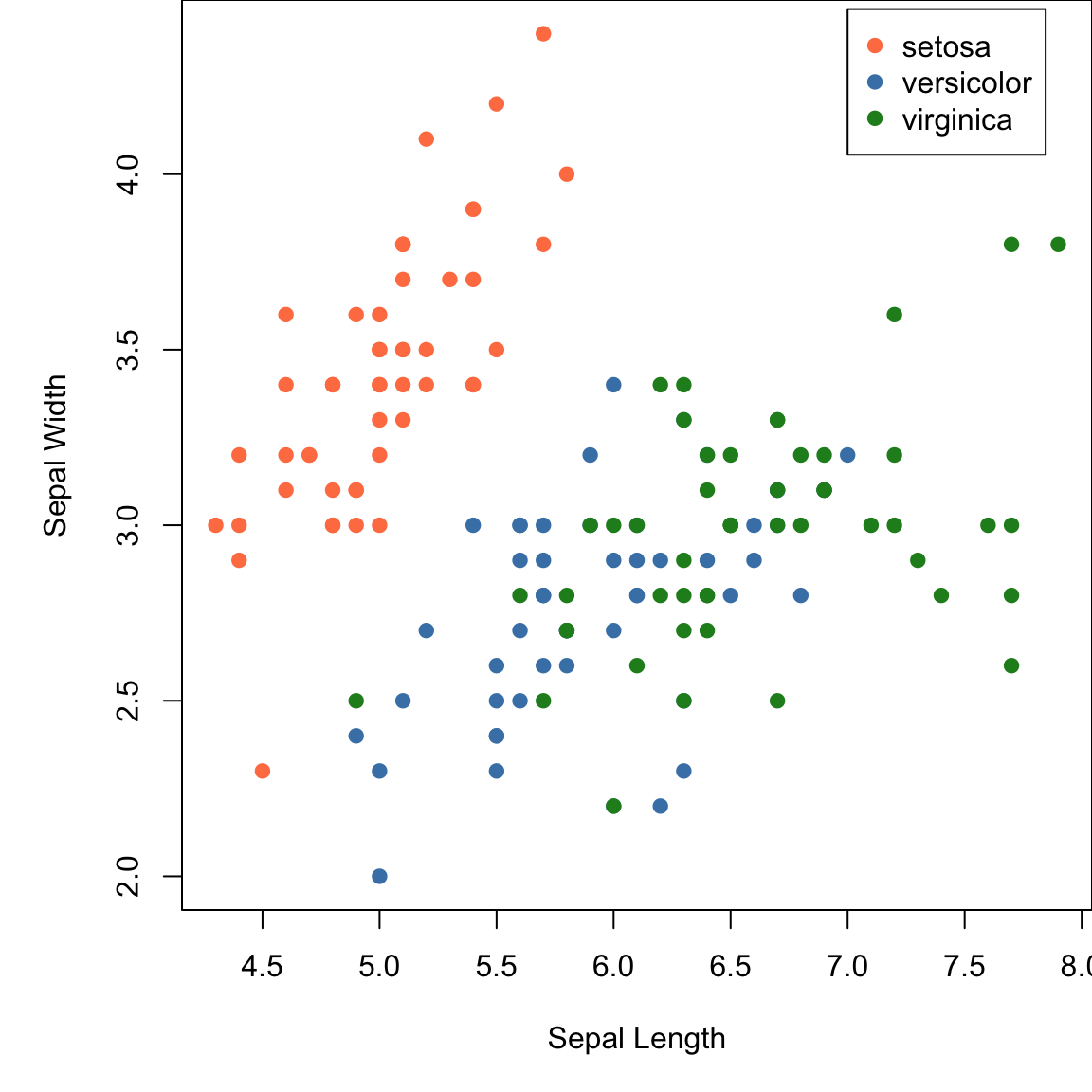
Plots using base R.
Static plots • ggplot2
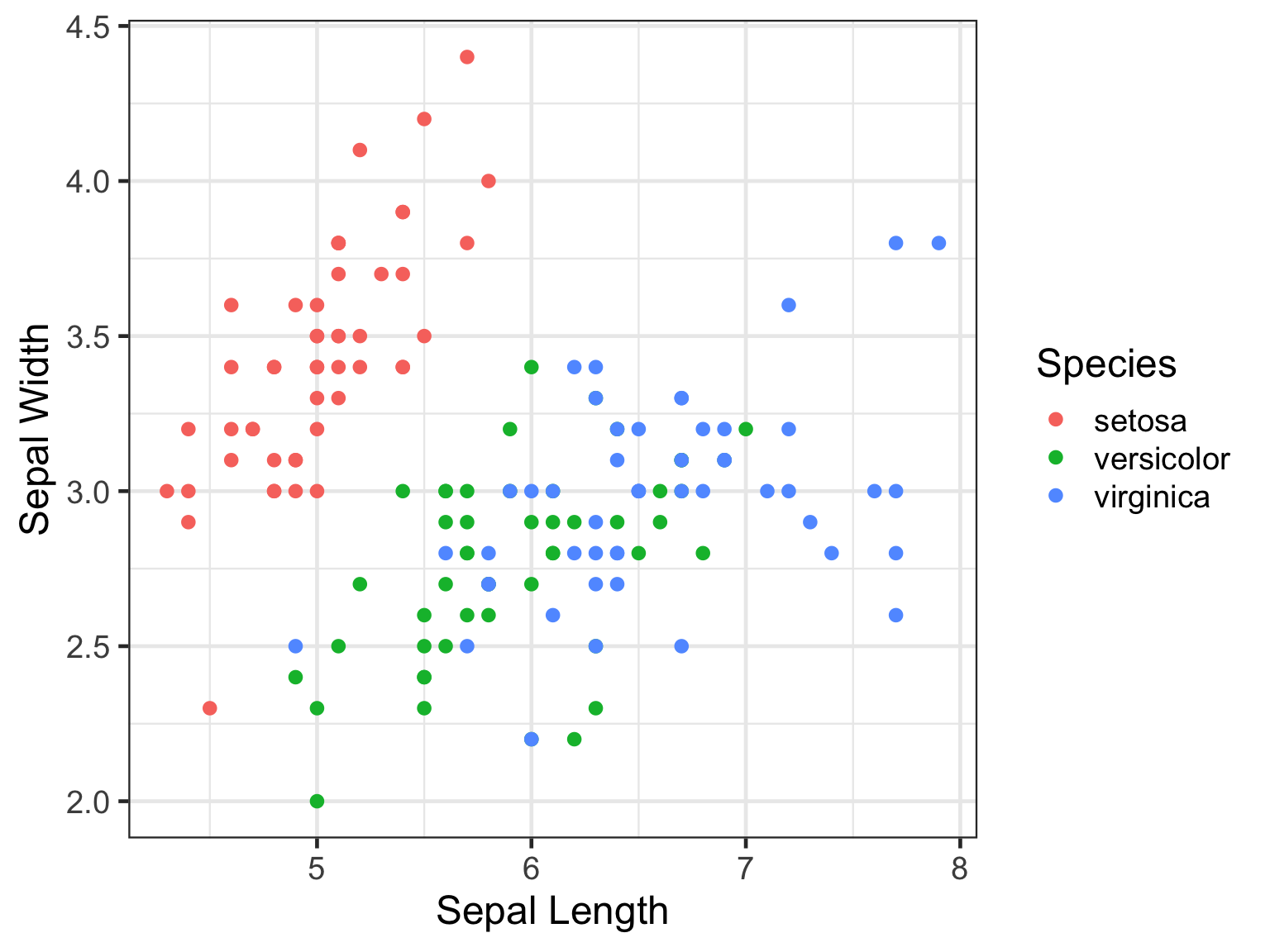
Plotting using ggplot2.
Interactive plots • highcharter
R package highcharter is a wrapper around javascript library highcharts.
library(highcharter)
h <- iris %>%
  hchart("scatter",hcaes(x="Sepal.Length",y="Sepal.Width",group="Species")) %>%
  hc_xAxis(title=list(text="Sepal Length"),crosshair=TRUE) %>%
  hc_yAxis(title=list(text="Sepal Width"),crosshair=TRUE) %>%
  hc_chart(zoomType="xy",inverted=FALSE) %>%
  hc_legend(verticalAlign="top",align="right") %>% hc_size(height=300,width=500)

htmltools::tagList(list(h))
Interactive plots • plotly
R package plotly provides R binding around javascript plotting library plotly.
Interactive plots • ggplotly
plotly also has a function called ggplotly which converts a static ggplot2 object into an interactive plot.
Interactive plots • ggiraph
R package ggiraph converts a static ggplot2 object into an interactive plot.
library(ggiraph)
p <- ggplot(iris,aes(x=Sepal.Length,y=Petal.Length,colour=Species))+
      geom_point_interactive(aes(tooltip=paste0("<b>Petal Length:</b> ",Petal.Length,"\n<b>Sepal Length: </b>",Sepal.Length,"\n<b>Species: </b>",Species)),size=1)+
  theme_bw()
tooltip_css <- "background-color:#f8f9f9;padding:10px;border-style:solid;border-width:2px;border-color:#125687;border-radius:5px;"
girafe(code=print(p), height_svg=2, width_svg=4,
  options=list(opts_hover(css="cursor:pointer;stroke:black;fill-opacity:0.3"), opts_zoom(max=5),
    opts_tooltip(css=tooltip_css,opacity=0.9), opts_sizing(width=0.6)))
Network graph
R package networkD3 allows the use of interactive network graphs from the D3.js javascript library.
Interactive maps • leaflet
R package leaflet provides R bindings for javascript mapping library; leafletjs.
Linking Plots • crosstalk
R package crosstalk allows crosstalk enabled plotting libraries to be linked. Through the shared ‘key’ variable, data points can be manipulated simultaneously on two independent plots.
library(crosstalk)
shared_quakes <- SharedData$new(quakes[sample(nrow(quakes), 100),])
lf <- leaflet(shared_quakes,height=300) %>%
        addTiles(urlTemplate='http://{s}.tile.openstreetmap.org/{z}/{x}/{y}.png') %>%
        addMarkers()
py <- plot_ly(shared_quakes,x=~depth,y=~mag,size=~stations,height=300) %>%
        add_markers()
div(div(lf,style="float:left;width:49%"),div(py,style="float:right;width:49%"))
ObservableJS
- Quarto supports ObservableJS for interactive visualisations in the browser.
ObservableJS
Define inputs
ObservableJS in quarto documentation.
Diagrams
Colourful
This slide has a colourful background
## Colourful {background-color="#ABEBC6"}Big Image
This slide has a background image
## Big Image {background-image="assets/featured.webp"}General tips
- Add custom css under YAML
css: "styles.css" - Export HTML to PDF using PDF export mode by pressing e
- For complete Quarto revealjs documentation, click here
Cover slide
Change title slide background image by adjusting the following YAML parameters.
---
title-slide-attributes:
  data-background-image: "assets/image.webp"
  data-background-size: "cover"
  data-background-opacity: "1"
---
To add custom end slide picture, set page title
## {background-image="assets/images/image.webp"}
Session
R version 4.5.3 (2026-03-11)
Platform: x86_64-conda-linux-gnu
Running under: Ubuntu 26.04 LTS

Matrix products: default
BLAS/LAPACK: /home/roy/miniforge3/envs/r-4.5/lib/libopenblasp-r0.3.33.so;  LAPACK version 3.12.0

locale:
 [1] LC_CTYPE=en_US.UTF-8       LC_NUMERIC=C
 [3] LC_TIME=en_US.UTF-8        LC_COLLATE=en_US.UTF-8
 [5] LC_MONETARY=en_US.UTF-8    LC_MESSAGES=en_US.UTF-8
 [7] LC_PAPER=en_US.UTF-8       LC_NAME=C
 [9] LC_ADDRESS=C               LC_TELEPHONE=C
[11] LC_MEASUREMENT=en_US.UTF-8 LC_IDENTIFICATION=C

time zone: Europe/Stockholm
tzcode source: system (glibc)

attached base packages:
[1] stats     graphics  grDevices utils     datasets  methods   base

other attached packages:
 [1] reactable_0.4.5   gt_1.3.0          crosstalk_1.2.2   leaflet_2.2.3
 [5] networkD3_0.4.1   dygraphs_1.1.1.6  ggiraph_0.9.6     plotly_4.12.0
 [9] highcharter_0.9.5 htmltools_0.5.9   ggplot2_4.0.3     DT_0.34.0
[13] formattable_0.2.1 kableExtra_1.4.0  stringr_1.6.0     tidyr_1.3.2
[17] dplyr_1.2.1

loaded via a namespace (and not attached):
 [1] tidyselect_1.2.1        viridisLite_0.4.3       farver_2.1.2
 [4] S7_0.2.2                fastmap_1.2.0           lazyeval_0.2.3
 [7] fontquiver_0.2.1        promises_1.5.0          digest_0.6.39
[10] mime_0.13               timechange_0.4.0        lifecycle_1.0.5
[13] magrittr_2.0.5          compiler_4.5.3          rlang_1.2.0
[16] sass_0.4.10             tools_4.5.3             igraph_2.3.3
[19] yaml_2.3.12             data.table_1.18.4       knitr_1.51
[22] labeling_0.4.3          htmlwidgets_1.6.4       curl_7.1.0
[25] xml2_1.6.0              TTR_0.24.4              RColorBrewer_1.1-3
[28] withr_3.0.3             purrr_1.2.2             grid_4.5.3
[31] gdtools_0.5.1           xts_0.14.2              xtable_1.8-8
[34] data.tree_1.2.0         scales_1.4.0            MASS_7.3-65
[37] cli_3.6.6               rmarkdown_2.31          generics_0.1.4
[40] otel_0.2.0              rlist_0.4.6.2           rstudioapi_0.19.0
[43] httr_1.4.8              commonmark_2.0.0        cachem_1.1.0
[46] assertthat_0.2.1        base64enc_0.1-6         vctrs_0.7.3
[49] jsonlite_2.0.0          fontBitstreamVera_0.1.1 litedown_0.9
[52] systemfonts_1.3.2       jquerylib_0.1.4         quantmod_0.4.29
[55] glue_1.8.1              reactR_0.6.1            lubridate_1.9.5
[58] stringi_1.8.7           gtable_0.3.6            later_1.4.8
[61] tibble_3.3.1            pillar_1.11.1           R6_2.6.1
[64] textshaping_1.0.5       shiny_1.14.0            evaluate_1.0.5
[67] lattice_0.22-9          markdown_2.0            backports_1.5.1
[70] broom_1.0.13            httpuv_1.6.17           bslib_0.11.0
[73] fontLiberation_0.1.0    Rcpp_1.1.1-1.1          svglite_2.2.2
[76] xfun_0.59               fs_2.1.0                zoo_1.8-15
[79] pkgconfig_2.0.3